CW
Send CW from the keyboard as you type, with F1–F5 macros, speed and sidetone controls, and a one-click RBN check.
Updated 12 Nov 2026
On this page
Put the radio in CW and the CW Keying group appears in the radio panel. The station keys the radio; you type.
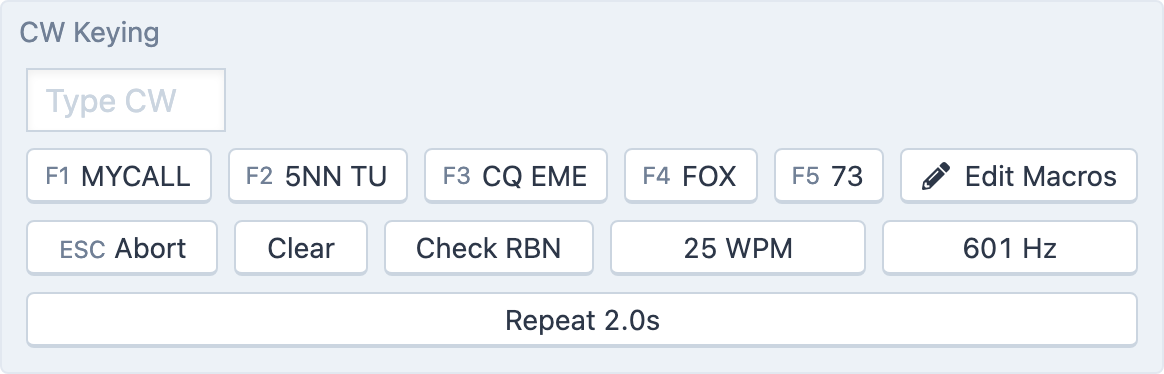
Sending as you type
Click in the Type CW box and type. Each character is sent as you press it, and the text you've sent builds up in gray beside the box with a blinking cursor while the station is still sending. Letters are sent in upper case.
- ESC Abort or the
Esckey stops sending at once. - Clear wipes the sent-text display.
- … WPM sets the speed, 5 to 50 WPM (6 to 48 on Icom radios).
- … Hz sets the sidetone pitch, 400 to 800 Hz (300 to 900 on Icom radios).
- Repeat …s sets the interval used when a macro repeats, 1.0 to 10.0 seconds.
The transmit monitor level, MON in the Transmit group, controls how loud you hear your own sending.
Macros
Five macro buttons sit under the box, labelled F1 to F5. Click one or press its function key to send it. Hold Shift while pressing the function key and the macro repeats at the Repeat interval until you press Esc; the repeating macro's button turns green.
Edit Macros opens Tools → Console Settings → Macros, where each macro has a short Label and its CW Text. The text can contain substitutions that are filled in when you send:
| Substitution | Becomes |
|---|---|
{MYCALL} | Your callsign, as the logbook will record it (with the station's prefix where required) |
{CALL} | The callsign in the Log Entry panel |
{STATE}, {COUNTY}, {GRID} | The station's state, county and grid square |
{ITUZ}, {CQZ}, {ARRLZ} | The station's ITU zone, CQ zone and ARRL section |
Macros with no text are hidden from the panel. A separate set of CW Run Mode Macros drives the Log Entry panel's run mode, where Enter and Shift-Enter send the right message for the stage of the QSO; see Run mode and ESM.
Check RBN
Check RBN sends TEST TEST <yourcall> <yourcall> <yourcall> K and switches the toolbox to DX Spots filtered to the Reverse Beacon Network skimmers that heard you, so you can see where your signal is landing before you call. A banner reads Showing my RBN spots only.; Reset clears the spots and Done returns to the normal spot list. See DX spots.
Using a paddle or key
If you'd rather send by hand, the console takes a paddle or straight key over USB MIDI and keys the station with its built-in iambic keyer. See HaliKey and MIDI keys, and CTR2-MIDI for a controller with a built-in keyer and a tuning knob.
Related articles
-
Operating the console
Transmitting
Push to talk from the keyboard, mouse or touch screen, use VOX, set power and the monitor, read the meters and understand transmit lockouts.
-
Contesting
Run mode and ESM
Run a CW pileup from the keyboard: Enter sends the right message for where you are in the QSO.
-
LocalMate & integrations
HaliKey and MIDI keys
Send CW with your own paddle or straight key over USB MIDI, with the console's built-in iambic keyer.
-
LocalMate & integrations
CTR2-MIDI controller
Set up the CTR2-MIDI's knob, six buttons and key jack to run the station and send CW.
Still stuck?
Tell us what you were trying to do and what happened, and we'll help.