Tuning and the VFO
Type a frequency, pick a band and mode from the presets, and tune with knobs, buttons or a slider.
Updated 12 Nov 2026
VFO A and VFO B share the same frequency row at the top of the radio panel. This article covers that row; the controls around it are in Icom radios.
Quick Tune
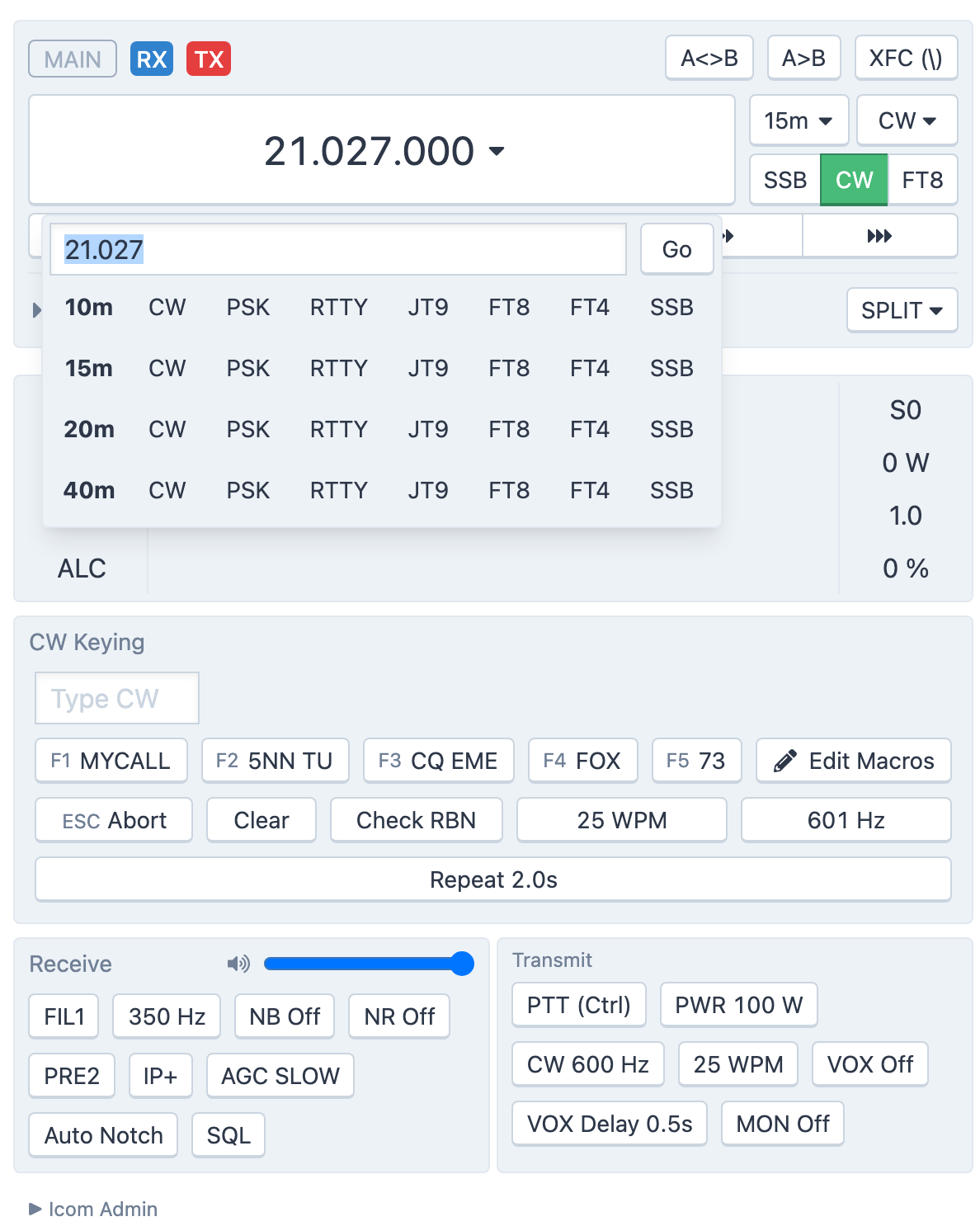
The large frequency readout is a button. Click it to open Tune VFO:
- Type a frequency in the box (placeholder kHz or MHz) and press
Enteror click Go. Numbers over 1000 are read as kHz, smaller ones as MHz, so14074,14074.0and14.074all land on the same spot. - Or click a preset in the band-by-mode table below the box. A preset sets the frequency and the mode together. Choosing a digital preset such as FT8 also prepares the radio for digital operation.
The table only lists the bands the station's antennas cover.
Band and mode
To the right of the readout are two menus and three buttons:
- Select Radio Band — jump to another band.
- Select Radio Mode — the full list of modes the radio offers.
- SSB, CW, FT8 — one-click modes. SSB picks the correct sideband for the frequency (LSB below 10 MHz, USB above), so you rarely need the mode menu. The active mode's button is green.
Tuning by hand
How you tune is up to you. Choose the style under Tools → Console Settings → View → VFO Control Style:
- Knobs — a knob beside the readout. Drag it round, or roll the mouse wheel over it. It works with touch too.
- Buttons — six arrow buttons below the readout, for 10, 100 and 1,000 Hz steps down and up. Hold a button to keep stepping; with the button focused,
SpaceorEntersteps once. - Slider — a horizontal slider below the readout; the step size shows at its right.
You can also click and drag directly on the scope and waterfall; see The scope and waterfall.
The two VFOs, split and the lock
The active VFO carries blue RX and red TX badges; the other VFO is collapsed to one line under it, and a click expands it so you can tune it too. A<>B swaps the VFOs and A>B copies A into B. SPLIT moves the transmitter to VFO B at an offset of +1, +5 or +10 kHz, and XFC lets you listen on it while you hold the button; see Icom radios.
A padlock in the readout means the VFO is locked and the frequency controls are disabled.
Out of band
If you tune outside the amateur bands the radio panel shows a warning. The station will not let you transmit there.
Related articles
-
Operating the console
The scope and waterfall
Read the spectrum, click to tune, zoom and pan, set the waterfall speed and show DX spots on it.
-
Operating the console
Icom radios
The Icom radio panel — VFO A and B, split, XFC, filters and receive settings, FM repeaters, and the transmit controls.
-
Operating the console
Console settings
Every option in Tools → Console Settings — PTT key, idle disconnect, themes, VFO style, spots display, macros and network relay.
Still stuck?
Tell us what you were trying to do and what happened, and we'll help.