Transmitting
Push to talk from the keyboard, mouse or touch screen, use VOX, set power and the monitor, read the meters and understand transmit lockouts.
Updated 12 Nov 2026
On this page
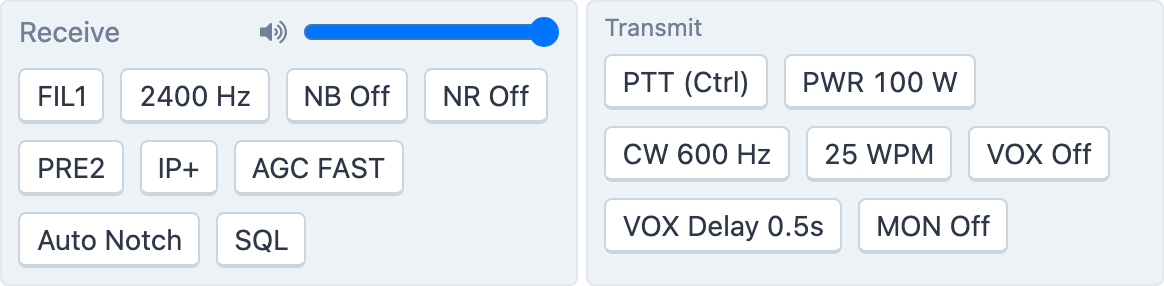
Transmitting needs a connection at a rate that allows it (see Connect to a station) and a working microphone (see Audio setup). The transmit controls are the Transmit group at the bottom of the radio panel.
Before you key up, know how you will identify: see Identifying yourself on the air.
Push to talk
- The PTT button — press and hold it with the mouse, or touch and hold on a phone or tablet. Letting go, or moving the pointer off the button, stops transmitting. The button shows the key it is bound to, for example PTT (Ctrl).
- The PTT key — hold it anywhere in the console. Choose it under Tools → Console Settings → General → PTT Key: Ctrl (Default), Shift, Ctrl + Shift, Alt/Option + Shift or Alt/Option + Spacebar.
- VOX — voice-operated keying, in the Transmit group. Lower the sensitivity slider to make it trigger more easily (Lower is more sensitive), and set VOX Delay, 0.1 to 2.0 s, for how long it holds after you stop talking. VOX runs in your browser: it keys the radio when your microphone level crosses the threshold.
- Voice macros — recorded calls on
F1toF5; see Voice macros.
The PTT button is disabled while PWR is set to zero.
Power and audio
- PWR — RF power in watts, up to the station's maximum for the rate you chose. The amplifier, where the station has one, is controlled from its own panel; see Amplifiers.
- MON — the transmit monitor, with a level, so you hear your own audio and sidetone.
- CW … Hz and … WPM — the CW pitch and keyer speed; see CW.
Meters
PWR (watts), SWR and ALC (percent) appear under the VFOs while you transmit, as far as the radio reports them. High SWR with the amplifier on usually means the wrong antenna is selected for the band; check the antenna panel.
Transmit lockouts
While the station can't key — while its tuner is moving, for example — a TX locked badge appears next to Transmit with the reason. It clears on its own when the station is ready. If you tune outside the amateur bands the radio panel warns you, and the station will not transmit there.
Related articles
-
Getting started
Identifying yourself on the air
The identification rules every member agrees to, including prefixes at stations outside the US and HH2AA.
-
Operating the console
Audio setup
Run the Audio Setup Wizard, allow the microphone in your browser, choose your speakers and mic, and set the volume.
-
Operating the console
CW
Send CW from the keyboard as you type, with F1–F5 macros, speed and sidetone controls, and a one-click RBN check.
-
Operating the console
Voice macros
Record your CQ and exchanges once and play them with F1–F5, with auto-repeat for calling CQ.
-
Operating the console
Amplifiers
Set the amplifier's level, read its power, SWR and temperature, and clear a fault.
Still stuck?
Tell us what you were trying to do and what happened, and we'll help.