Icom radios
The Icom radio panel — VFO A and B, split, XFC, filters and receive settings, FM repeaters, and the transmit controls.
Updated 12 Nov 2026
On this page
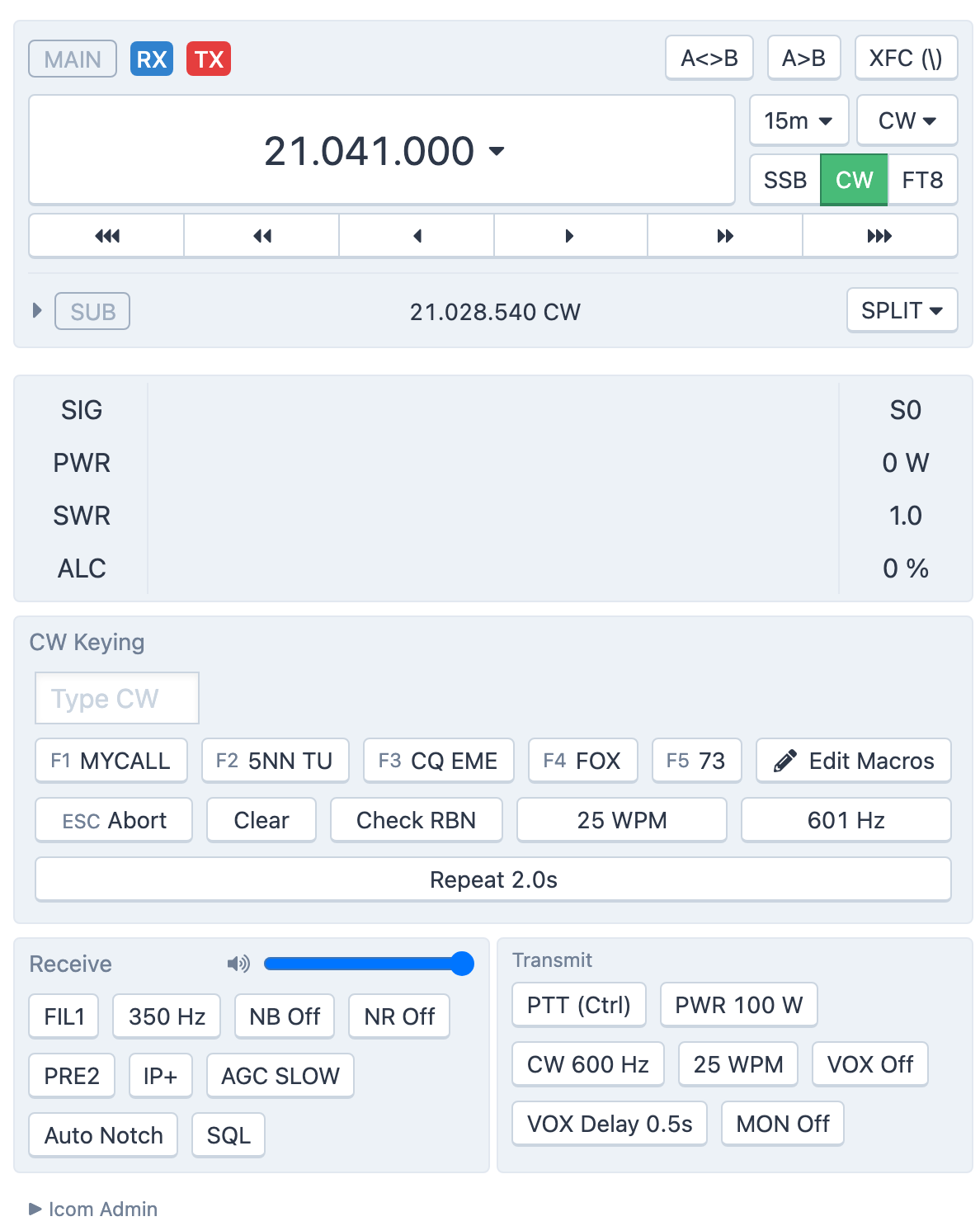
Icom stations show the radio's two VFOs much as the radio's own display does, with the receiver and transmitter settings in two groups below. The scope and waterfall are described in The panadapter and waterfall.
VFO A and VFO B
The active VFO sits at the top of the panel with the frequency row from Tuning and the VFO. Its badges show which VFO is doing what: blue RX on the receiving VFO, red TX on the transmitting one. The other VFO is collapsed to one line under it; click the line to expand it and tune it directly.
- A<>B swaps the two VFOs.
- A>B copies VFO A's frequency and mode into VFO B.
- XFC (\) — transmit frequency check. Hold the button, or hold the
\key, to listen on the transmit VFO and tune it; release to go back. Handy for finding the DX's listening frequency in a split pileup. - SPLIT — a menu with +1, +5 and +10 kHz (or the channels, on 60 m), plus On and Off. With split on, the TX badge moves to VFO B. The button turns orange while split is on.
Meters
SIG is the S-meter; PWR (watts), SWR and ALC (percent) appear while you transmit, as far as the radio reports them.
Receive
- Master Volume — the receiver volume in your browser (the same control as the Audio menu).
- FIL1, FIL2, FIL3 — click to cycle the radio's three filter presets, and BW to set the IF filter width in hertz, on radios that allow it.
- NB and NR — the noise blanker and noise reduction, each with an on/off button and a level.
- PRE OFF, PRE1, PRE2 — cycle the preamplifier.
- IP+ — the radio's IP+ mode.
- AGC SLOW, AGC MID, AGC FAST — cycle the AGC speed.
- Auto Notch.
- SQL — the squelch level.
- RX ANT — switch to the receive antenna, on stations that have one.
FM repeaters
On FM, an FM Repeater group appears on radios with duplex control:
- Repeaters — a list of the repeaters near the station. Pick one and the console sets the frequency, duplex direction, offset and tone for you.
- DUP OFF, DUP-, DUP+ — the duplex direction.
- OFFSET — the repeater offset, from the standard values.
- TONE — turn the CTCSS tone on or off, and PL to choose its frequency.
Transmit
- PTT — see Transmitting. The button is disabled while the power is set to zero.
- PWR — RF power in watts.
- CW … Hz — the CW pitch, 300 to 900 Hz.
- … WPM — keyer speed, 6 to 48 WPM.
- VOX with a sensitivity slider (Lower is more sensitive) and VOX Delay, 0.1 to 2.0 s. On Icom stations VOX runs in your browser: it keys the radio when your microphone level crosses the threshold, and lets go after the delay.
- MON — the transmit monitor, with a level.
In CW a CW Keying group appears above the receive settings: the type-ahead keyer and macros described in CW.
Related articles
-
Operating the console
Tuning and the VFO
Type a frequency, pick a band and mode from the presets, and tune with knobs, buttons or a slider.
-
Operating the console
The scope and waterfall
Read the spectrum, click to tune, zoom and pan, set the waterfall speed and show DX spots on it.
-
Operating the console
Transmitting
Push to talk from the keyboard, mouse or touch screen, use VOX, set power and the monitor, read the meters and understand transmit lockouts.
-
Operating the console
CW
Send CW from the keyboard as you type, with F1–F5 macros, speed and sidetone controls, and a one-click RBN check.
Still stuck?
Tell us what you were trying to do and what happened, and we'll help.