HaliKey and MIDI keys
Send CW with your own paddle or straight key over USB MIDI, with the console's built-in iambic keyer.
Updated 12 Nov 2026
On this page
You can send CW on RHR with a real key. A small USB adapter turns your paddle or straight key into a MIDI device, the browser reads it directly, and the console times the dits and dahs and keys the station. No software to install, and it works on every station.
Two adapters are supported:
- The HaliKey MIDI, which implements the MoMIDI specification. MoMIDI carries the exact timing of each key closure, so your fist arrives intact.
- The CTR2-MIDI, whose key jack does the same job alongside its knob and buttons.
Both need Chrome, Edge or Firefox. Safari has no MIDI support.
Set up a HaliKey
- Plug your paddle or key into the HaliKey, and the HaliKey into a USB port.
- Open Tools → Integrations and choose HaliKey MIDI.
- Check Enable HaliKey MIDI and allow the browser to use MIDI devices when it asks.
- Under MIDI Device, pick HaliKey (recommended). Click Refresh if it is missing.
- Decide who does the timing:
- Use software keyer checked (paddles): the console's iambic keyer turns your paddle's dit and dah contacts into properly timed elements.
- Use software keyer unchecked (straight key, bug or an external keyer): the key's closures are sent to the station exactly as you make them.
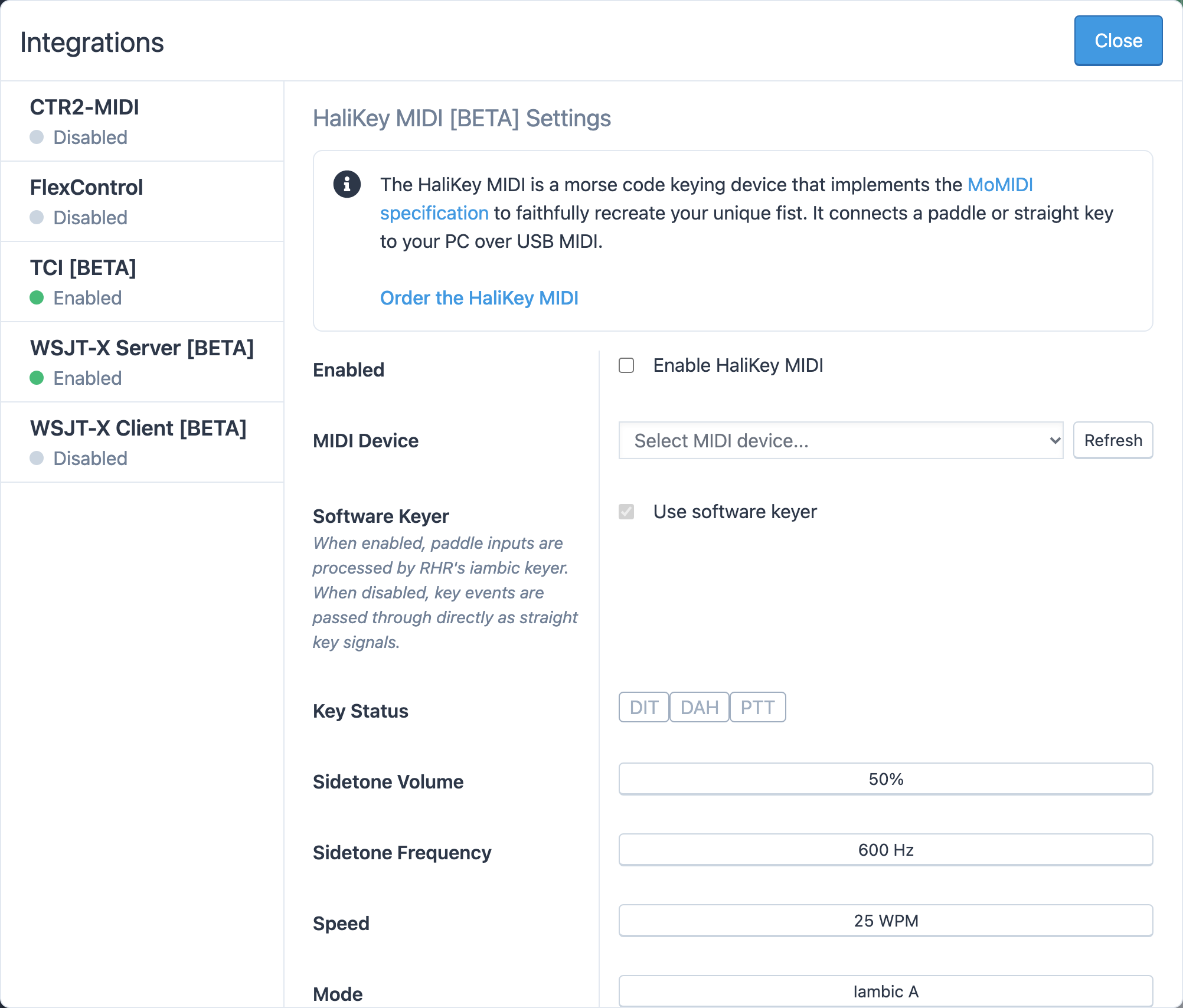
Key Status shows the dit, dah and key inputs light up as you press them, which is the quickest check that everything is connected.
Keyer settings
| Setting | Range | Notes |
|---|---|---|
| Sidetone Volume | 0–100% | The tone you hear in your speakers as you send. The station's monitor is separate. |
| Sidetone Frequency | 400–800 Hz | |
| Speed | 5–40 WPM | Software keyer only. |
| Mode | Iambic A or Iambic B | Iambic B adds one more element after you release squeezed paddles. |
| Weight | −50% to +50% | Heavier makes every dit and dah longer while keeping the spacing. Default is 0. |
| Dah Length | 2.0–4.0 dits | 3.0 Dits (Default) is standard. |
The same settings appear on the CTR2-MIDI tab.
Using it
Connect to a station and switch the radio to CW. Your key works alongside the console's type-ahead CW and macros. The sidetone comes from your computer, so it has no delay; the signal you hear on the station's monitor arrives a little later because it has travelled to the station and back.
Related articles
-
Operating the console
CW
Send CW from the keyboard as you type, with F1–F5 macros, speed and sidetone controls, and a one-click RBN check.
-
LocalMate & integrations
CTR2-MIDI controller
Set up the CTR2-MIDI's knob, six buttons and key jack to run the station and send CW.
-
LocalMate & integrations
Integration changes in 2026
The desktop app retires on January 1, 2027. What replaces it, and what to do if you use serial devices or DXmate.
Still stuck?
Tell us what you were trying to do and what happened, and we'll help.