FlexControl knob
Tune and run the station with FlexRadio's USB knob, paired straight to your browser.
Updated 12 Nov 2026
On this page
The FlexControl is a USB tuning knob with three programmable buttons and a push-button knob. In the console it tunes every brand of radio on the network, not only Flex, and it connects directly to the browser. LocalMate is not needed.
Browsers
The knob uses the browser's serial port support. Use Chrome, Edge or another Chromium browser, or Firefox 141 or newer. Safari cannot connect to it, and the settings tab says so: Web Serial is not supported in this browser.
Pair the knob
- Plug the FlexControl in.
- Open Tools → Integrations and choose FlexControl.
- Check Enable FlexControl.
- Under Serial Port, click Pair Device. The browser lists serial devices; choose the FlexControl and confirm.
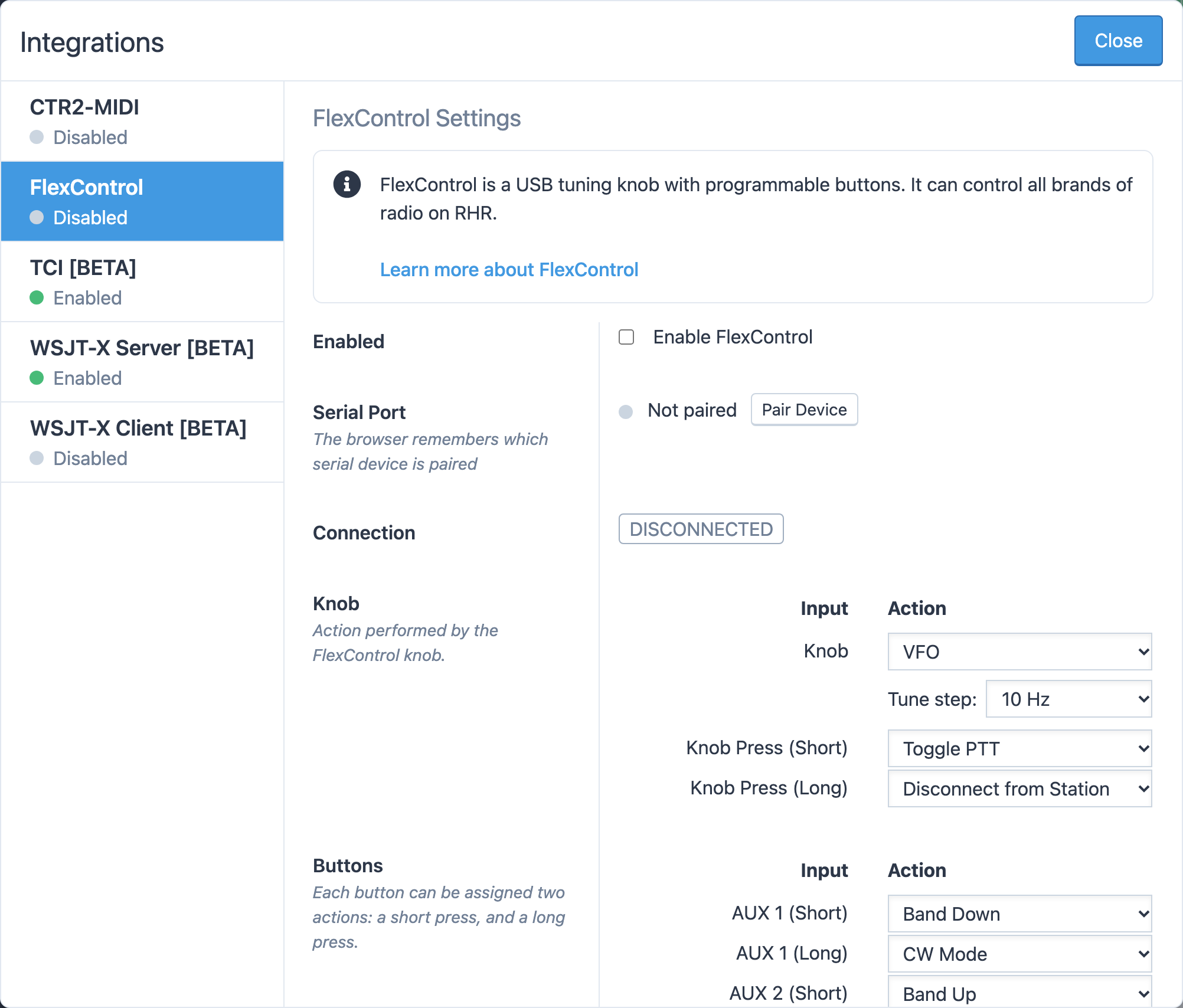
Connection shows Connected when the knob is talking to the console. The browser remembers the pairing, so from now on the knob connects as soon as you open the console. Re-pair Device picks a different device, and Unpair forgets it.
If Connection shows Error, another program may have the knob open. Close it and click Retry.
What the knob does
Each control has an action. The defaults:
| Control | Default action |
|---|---|
| Knob | VFO, 10 Hz per step |
| Knob Press (Short) | Toggle PTT |
| Knob Press (Long) | Disconnect from Station |
| AUX 1 (Short) | Band Down |
| AUX 1 (Long) | CW Mode |
| AUX 2 (Short) | Band Up |
| AUX 2 (Long) | SSB Mode |
| AUX 3 (Short) | Toggle NR |
| AUX 3 (Long) | Toggle NB |
Turning faster tunes in bigger steps.
Change the actions
Under Knob and Buttons, pick an action for each control. A short press and a long press of the same button can do different things. The actions available to buttons are PTT, Toggle PTT, Toggle NR, Toggle NB, Toggle Vox, CW Mode, SSB Mode, FT8 Mode, FT4 Mode, DIGU Mode, DIGL Mode, AM Mode, FM Mode, Band Up, Band Down and Disconnect from Station. The knob can be the VFO, with a step of 10, 20, 50, 100, 200, 500 or 1000 Hz, or a level: Slice Volume, NR Level, NB Level, Vox Level or CW WPM.
Reset to Defaults restores the table above.
Event Log
The Event Log at the bottom of the tab lists every turn and press the console receives from the knob, with a time stamp. If a button seems dead, press it and watch the log: an entry means the knob works and the action is the problem; no entry means the connection is.
Related articles
-
LocalMate & integrations
CTR2-MIDI controller
Set up the CTR2-MIDI's knob, six buttons and key jack to run the station and send CW.
-
Operating the console
Tuning and the VFO
Type a frequency, pick a band and mode from the presets, and tune with knobs, buttons or a slider.
-
Operating the console
Console settings
Every option in Tools → Console Settings — PTT key, idle disconnect, themes, VFO style, spots display, macros and network relay.
Still stuck?
Tell us what you were trying to do and what happened, and we'll help.