Browse and edit contacts
Filter your contacts, fix or delete them, move them between logbooks, and manage the logbooks themselves.
Updated 12 Nov 2026
On this page
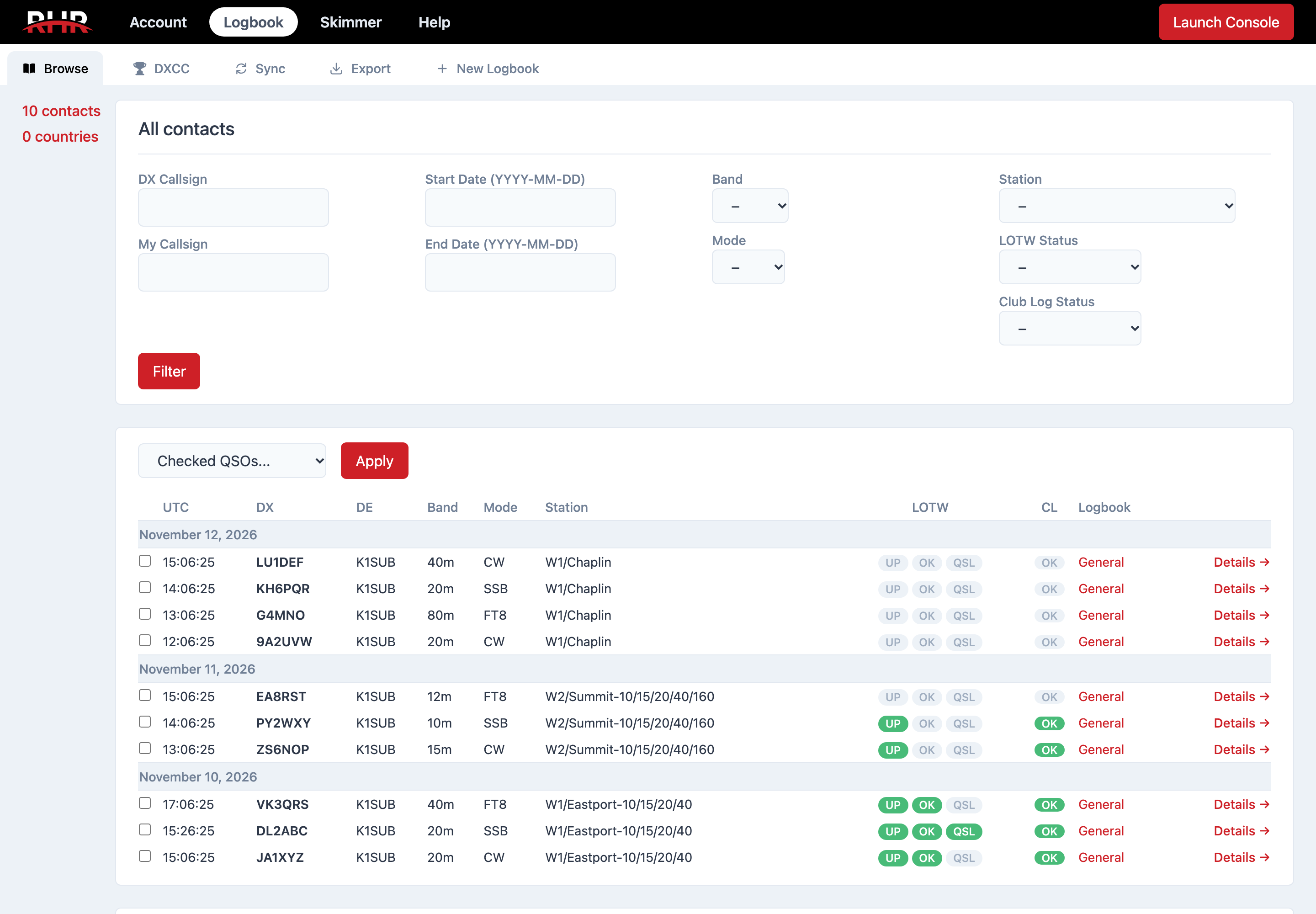
The Browse tab at /logbook shows all your contacts, newest first, with a date header for each day. Click a logbook in the sidebar to see just that one; its header shows the callsign and country, and Logbook Settings opens its settings.
Filtering
The filters above the table narrow what you see, and they also drive the export at the bottom of the page:
- DX Callsign and My Callsign
- Start Date and End Date, as YYYY-MM-DD
- Band, Mode and Station
- LOTW Status: Not Submitted, Submitted, Accepted or Confirmed
- Club Log Status: Not Submitted, Submitted or Error
Click Filter to apply. The filters stay in the page address, so you can bookmark a view.
Reading the table
Each row has the UTC time, the DX callsign, DE (the callsign you used), Band, Mode, Station, and two sync columns. LOTW shows three pills: UP once the contact has been uploaded, OK once LoTW has accepted it, and QSL once the other station has confirmed; a red UP means the upload failed, and hovering shows why. CL is the Club Log status. Details → opens the contact.
Editing a contact
The contact page shows every field, its Club Log and LoTW status, and when it was exported from RHR. Edit contact details lets you change the callsign, time, frequency and band, mode, reports, exchanges, grid, your callsign, satellite details and notes. From the contact page you can also resubmit it to Club Log or LoTW, or delete it.
For a quick fix to the callsign or an exchange, use Quick Edit in the console's Log tab instead.
Acting on several contacts
Tick the boxes on the left (hold Shift to select a range), choose an action from Checked QSOs... and click Apply:
- Resubmit to LoTW and Resubmit to Club Log
- Move to... another of your logbooks
- Delete, after a confirmation. Deleting cannot be undone.
Managing logbooks
New Logbook asks for a Logbook Name, the Callsign Used and the DXCC Country, and whether to Make this my default logbook for that country's contacts. A logbook's settings page changes its name and callsign and lets you make it the default.
To delete a logbook open its settings. An empty logbook deletes at once. One with contacts asks whether to Permanently delete them or Move them to another logbook. A default logbook cannot be deleted until another logbook is made the default for that country.
Related articles
-
Logbook
The RHR logbook
How your contacts are stored, which logbook they go to, and where they sync.
-
Logbook
Export ADIF and CSV
Download your contacts for another logger or an award program, all at once or only the new ones.
-
Logbook
LoTW sync
Link Logbook of The World, add your TQSL certificate, and let RHR sign and upload your contacts twice a day.
Still stuck?
Tell us what you were trying to do and what happened, and we'll help.