Contest logging
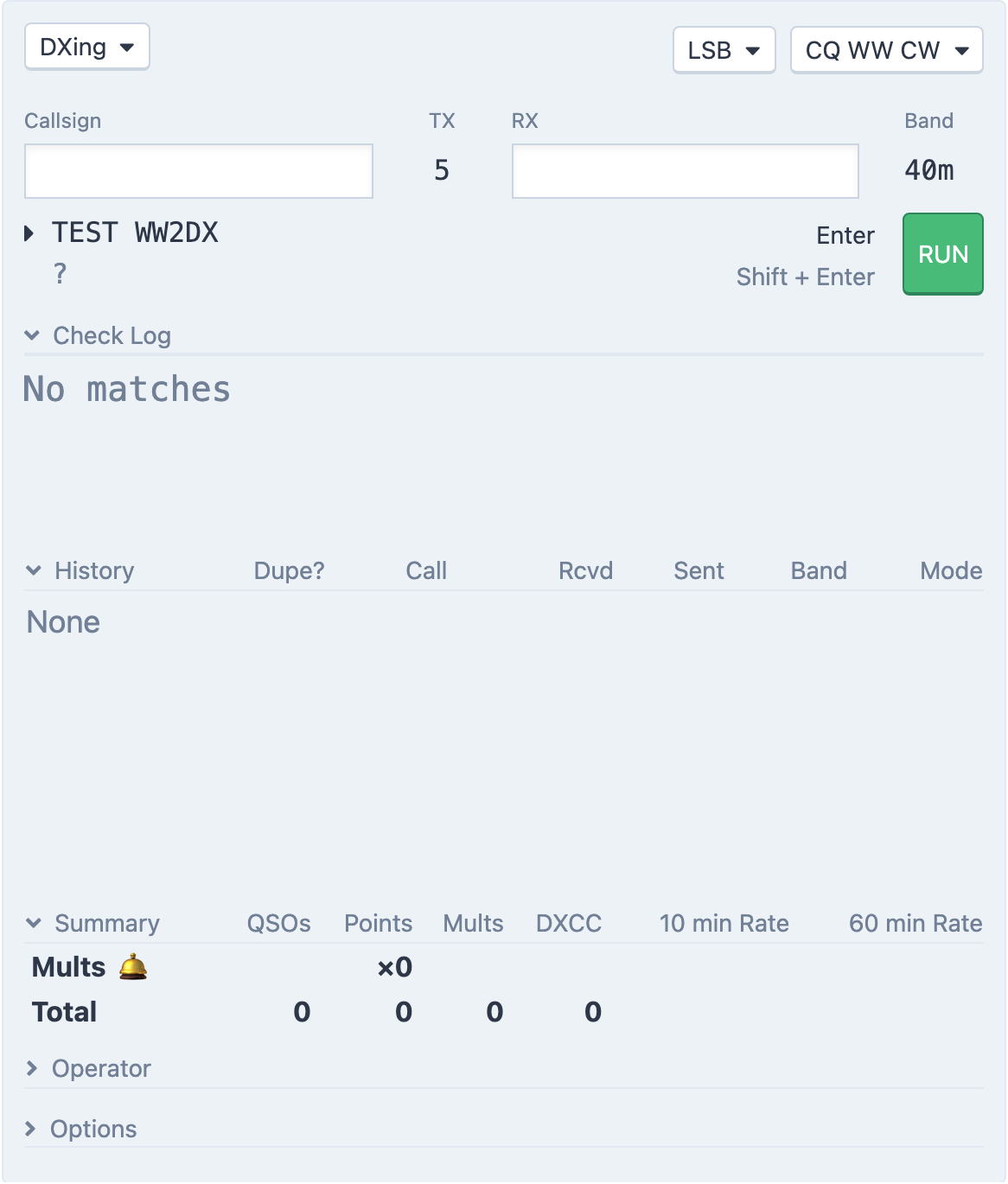
The contest fieldsets in the Log Entry panel, with dupe checks, live score and a Cabrillo download.
Updated 12 Nov 2026
On this page
The Log Entry panel has a fieldset for each supported contest. Pick one from the fieldset menu and the panel becomes a contest logger: the exchange is checked as you type, dupes and multipliers are flagged, the score updates with every contact, and you can download a Cabrillo file when it is over.
The fieldsets
| Fieldset | Received exchange | Sent exchange |
|---|---|---|
| CQ WW CW, CQ WW SSB | CQ zone (RX) | Your zone (TX) |
| IARU | ITU zone or society (RX) | Your zone (TX) |
| WPX CW - Single Op, WPX SSB - Single Op | Serial (RX Serial) | Serial (TX Serial) |
| WPX CW - Multi Op, WPX SSB - Multi Op | Serial | Serial, per band |
| SP DX | Province (RX Province) | Serial (TX Serial) |
The plain Contesting fieldset (Callsign, Exch Rcvd, Exch Sent) is for any other contest; it has none of the scoring below.
The Band shown comes from the radio. The sent exchange is filled in for you: zones from the station's location, or whatever you enter under Options → My Exchange, and WPX serials from RHR, so several operators never send the same number. RST is logged as 599 or 59 automatically.
While you operate
- The callsign turns red for a new multiplier (green when it counts for two at once, such as a new zone and a new country in CQ WW), blue for a new station on this band, and grey for a dupe. A ⚠️ next to the exchange means it is not valid for the contest.
- Check Log shows Super Check Partial matches for what you have typed so far, from the master callsign list and your own log.
- History lists your earlier contacts with this callsign; a dupe on the current band is marked DUPE! in red.
- Summary shows, per band and in total, QSOs, Points, Mults, DXCC and your 10 min Rate and 60 min Rate. The band you are on is highlighted.
- In the DX Spots tab, spots that would be a new multiplier are flagged in the MULT! column.
- Press
`(backtick) orCtrl-Wto wipe the entry without logging it.
In the CW fieldsets Enter also sends CW; see Run mode and ESM.
Options
Options at the bottom of the fieldset holds:
- Operator, in the Multi Op fieldsets, recorded on each contact and used for the per-operator table in Summary.
- My Exchange and My Continent (and My DXCC for CQ WW), when the station's own values are not what you want to send or score with.
- Mult Bell, which rings when you log a new multiplier (a 🛎 shows in the Summary).
- Download Cabrillo Log, which saves
CONTEST-YEAR-CALL.txtwith every contact in the logbook. Log file requires editing before submission: the header's category, club, name and address lines are placeholders you must fill in before you send it to the sponsor.
In the WPX fieldsets the panel also shows Posting to scoreboard as CALL while it reports your score to the online scoreboard each minute.
Related articles
-
Contesting
Run mode and ESM
Run a CW pileup from the keyboard: Enter sends the right message for where you are in the QSO.
-
Contesting
Multi-op teams
Several operators, several stations, one log, and an interlock that keeps one signal per band.
-
Logbook
Logging from the console
The Log Entry panel, its keyboard flow, and the Log tab for quick edits.
-
Operating the console
DX spots
The DX cluster and RBN in the console — filter spots, see what you still need, and tune and turn the beam in one click.
Still stuck?
Tell us what you were trying to do and what happened, and we'll help.